Browser-driven · OIDC · OPA · Open source

Kubernetes debug terminal,
in your browser.

porthole drops an ephemeral container next to any running pod, attaches to it from a slick web terminal, and logs every decision. Identity verified at the edge by your OIDC gateway. Every namespace touch decided by OPA. kubectl exec for developers who don't need kubectl.

  • Single Go binary. Embeds the SPA. One port, REST and WS share it.
  • Bring your own debug image — busybox, netshoot, psql, your own forensics toolkit.
  • OIDC handshake stays at the gateway; porthole just verifies the JWT.

Why

The friction between a developer and a misbehaving pod, removed.

Lens and k9s are great if every developer has cluster credentials and a kubeconfig. Most don't. porthole hands them a URL, an OIDC login, and a terminal — backed by ephemeral containers so the target pod stays exactly as deployed.

A typical session — pick a namespace, pick a pod, inject netshoot, get a shell.

Install

One helm install away.

The chart at oci://ghcr.io/bcollard/charts/porthole ships the Deployment, ServiceAccount + cluster-wide RBAC, and an OPA sidecar pre-loaded with a sensible default policy. Bring your own OIDC-aware front (Envoy Gateway, ingress-nginx + oauth2-proxy, Traefik, …) — porthole only cares that X-ID-Token or Authorization: Bearer … contains a JWT it can verify against your IdP's JWKS.

$ helm install porthole oci://ghcr.io/bcollard/charts/porthole \
    --namespace porthole --create-namespace \
    -f my-values.yaml

my-values.yaml — two shapes to start from

Smallest possible setup — runs in kind or any cluster you can kubectl port-forward into. No JWT validation, no OPA sidecar: porthole stamps every request as the local-dev principal and short-circuits authZ.

# Skip JWT validation entirely. porthole stamps every request
# as the `local-dev` principal — fine over kubectl port-forward,
# never production. The default OPA data binds `local-dev` →
# admin cluster-wide, so the UI lights up immediately.
auth:
  disabled: true

# Optional — turn the OPA sidecar off too to keep the pod
# single-container. porthole short-circuits authZ to allow.
opa:
  enabled: false

$ kubectl -n porthole port-forward svc/porthole 8081:8081http://localhost:8081/ui/

Identity & authorization

Identity at the edge. Decisions next door.

porthole separates who from what's allowed. Your gateway proves who. OPA decides what. Both arrows are independent so you can swap either side without touching the other.

AuthN — the gateway proves who.

The gateway runs the OIDC handshake (Keycloak, Auth0, Google, …) and forwards the validated request upstream with the ID token in a header. porthole reads X-ID-Token first, falls back to Authorization: Bearer …, validates against your IdP's JWKS, and extracts sub, email, groups.

# SecurityPolicy on Envoy Gateway
spec:
  oidc:
    provider:
      issuer: "https://idp.example.com/realms/eng"
    clientID: "porthole"
    clientSecret:
      name: porthole-oidc-secret
    scopes: [openid, profile, email]
    forwardAccessToken: true

AuthZ — OPA decides what.

Every API call porthole serves is gated by one of six hardcoded actions (defined in pkg/auth/opa.go). The action, the user (from the JWT), and the live namespace labels go to OPA; OPA returns {allow, reason} and the reason flows straight into the audit log. "Roles" in the policy data are just your own human-friendly bundles of these actions — the action names themselves are not extensible from the policy.

ActionWhat it gates
list_namespacesPopulating the namespace sidebar. Cluster-scoped — only an unconditional namespace_glob: "*" binding (no label constraints) can grant it.
list_podsListing pods, services, and live namespace labels for a namespace.
list_ecListing porthole-injected ephemeral containers already running on a pod.
inject_ecPatching the pod's ephemeralcontainers subresource to start a new debug container.
attach_ecOpening the WebSocket PTY stream to an ephemeral container.
terminate_ecKilling a porthole-injected ephemeral container.

Skip both layers. Every request becomes the local-dev principal; OPA isn't consulted. Zero JWT validation, zero policy evaluation — useful for tearing things apart over kubectl port-forward.

auth:
  disabled: true     # JWT validation off — `local-dev` for everyone
opa:
  enabled: false    # authZ short-circuits to allow
Policy is data. Roles, bindings, and namespace-label requirements live in JSON mounted as a ConfigMap. opa eval against the same file gives the platform team a regression suite that runs anywhere.

Audit

One ECS JSON line per security-relevant action.

Every inject, attach-deny, and cleanup emits a structured slog line on stdout shaped to the Elastic Common Schema (v8.11). Picks up cleanly in Elastic, Loki, Splunk — anything that keys on event.action, event.outcome, user.id, or kubernetes.namespace, with no custom parser.

{
  "@timestamp":    "2026-06-07T10:53:45Z",
  "log.level":     "WARN",
  "message":       "inject",
  "ecs.version":   "8.11",
  "event": {
    "kind":        "event",
    "category":    ["iam"],
    "action":      "inject_ec",
    "type":        "denied",
    "outcome":     "failure",
    "dataset":     "porthole.audit",
    "provider":    "porthole",
    "duration":    12387251,
    "reason":      "matched: group=junior-devs role=debugger ns=dev-checkout — outside business hours"
  },
  "user":          { "id": "alice@example.com" },
  "source":        { "ip": "10.0.1.5" },
  "kubernetes": {
    "namespace":   "dev-checkout",
    "pod":         { "name": "api-7d4b9c5f-mznpr" }
  },
  "container": {
    "image":       { "name": "nicolaka/netshoot" }
  }
}

Compare

Porthole vs. similar projects.

Porthole is a narrow tool: a browser-based attach-to-pod terminal that injects ephemeral containers, validates JWTs from an upstream OIDC gateway, and asks OPA for authorization. Here's how it lines up against three projects that overlap in different ways.

Porthole Teleport Headlamp Lens / OpenLens
Form factor Web (in-cluster) Web + CLI (tsh) Web (in-cluster or desktop) Desktop (Electron)
Primary purpose Attach-to-pod terminal Access platform (SSH, k8s, DB, RDP, apps) General-purpose k8s dashboard General-purpose k8s IDE
Exec mechanism Ephemeral container (any image) kubectl exec into existing container kubectl exec into existing container kubectl exec into existing container
Custom debug image Yes — per-session, any registry No (uses container's own shell) No No
Authentication JWT from upstream OIDC gateway (BYO IdP) Built-in IdP + SSO connectors (SAML / OIDC / GitHub) OIDC (built-in) or kubeconfig Local kubeconfig only
Authorization OPA sidecar (Rego + bindings) Built-in RBAC (Teleport roles) Kubernetes RBAC (impersonation) Kubernetes RBAC (user's kubeconfig)
Multi-cluster No (one cluster per install) Yes (cluster of clusters) Yes Yes
Audit log Structured slog JSON per inject / attach / cleanup Yes, with session recording / replay No native audit (k8s audit log applies) No (runs on user's laptop)
Footprint One Deployment + OPA sidecar Multi-component (auth, proxy, agents, backend store) One Deployment Desktop install per user
License Apache-2.0 Apache-2.0 (Community) + paid Enterprise Apache-2.0 (CNCF Sandbox) Lens: Mirantis EULA. OpenLens: MIT

In one line: pick Porthole when you already have an OIDC gateway, you want one central audit trail of pod attaches, and you regularly need to debug pods that don't ship with their own shell. If any one of those three is false, one of the projects above is probably a better fit.

Under the hood

One websocket. Three byte paths. Zero magic.

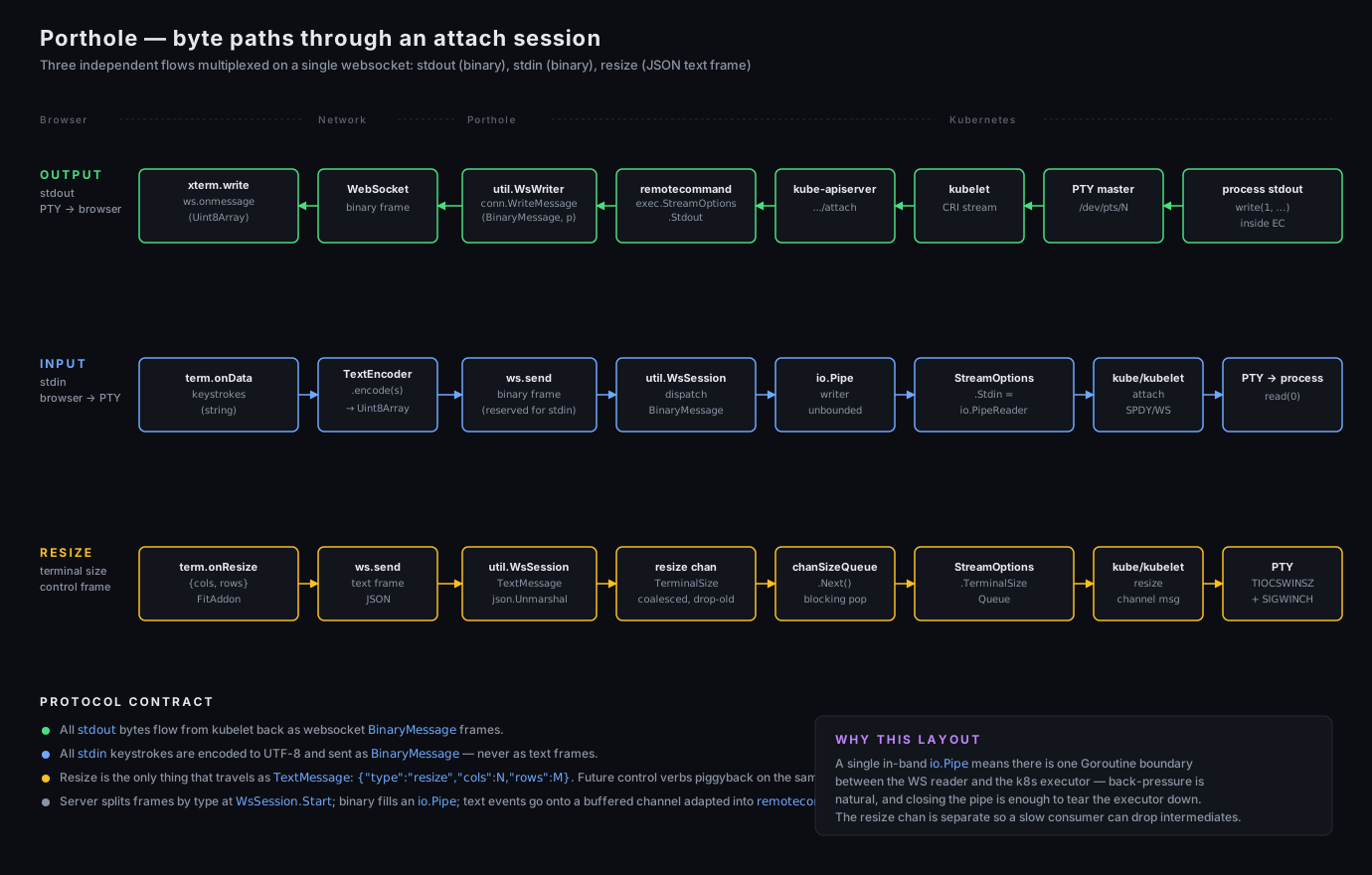
Stdout, stdin, and terminal resize each travel on the single browser ↔ porthole websocket — two as binary frames, one as a JSON text frame. The k8s remotecommand executor stitches the upstream half. The diagram below traces a byte from xterm.js all the way to the kubelet PTY.

Porthole traffic flow diagram. Three rows show the byte paths through an attach session — OUTPUT (kubelet PTY → xterm.js, green), INPUT (xterm.js keystrokes → io.Pipe → kube-apiserver, blue), and RESIZE (xterm.js → TerminalSizeQueue → kubelet, yellow). All three multiplex on a single WebSocket between browser and porthole.
Three independent flows multiplexed on a single websocket: stdout (binary), stdin (binary), resize (JSON text frame).

FAQ

Common questions.

How is this different from kubectl debug or Lens?

kubectl debug requires every developer to have a working kubeconfig and the right RBAC. Lens is great but assumes the same. porthole removes the kubeconfig from the developer's laptop entirely — the cluster sees a single SA (porthole's), and a corporate OIDC identity gets translated into namespace-scoped permission via OPA. The footprint on developers is just a URL.

Why ephemeral containers?

They give you kubectl exec ergonomics without modifying the workload container. Different image (your forensics toolkit, psql, …), same network namespace, same volumes as the target. The pod's deployment YAML stays untouched.

Why an OPA sidecar instead of in-process rules?

Because policies grow. The Rego file in the repo demonstrates: groups from the JWT, namespace label match, glob namespace matching, business-hours constraints — combined in arbitrary ways without recompiling porthole. Sidecar gives you hot reload on a ConfigMap update.

Does porthole need its own database?

No. All state lives in Kubernetes (the ephemeral container, the kube events) or in the JWT (identity). porthole itself is stateless — you can run multiple replicas behind the gateway.

What does it log?

One slog JSON line per inject and per attach-deny: user, source_ip, namespace, pod, image, outcome, reason, duration_ms. Successful attaches show up in gin's access log; the byte stream is never logged.

Can I use a gateway other than Envoy Gateway?

Yes. Anything that does OIDC and forwards a JWT in a header upstream works — Kong, Traefik EE, Apache APISIX, Cloudflare Access, an oauth2-proxy in front. porthole only cares that X-ID-Token or Authorization: Bearer … contains a JWT that validates against the JWKS URL you set.

How does resize work over the websocket?

The websocket is the only channel. Stdin and stdout travel as binary frames; the browser sends a JSON text frame for resize: {"type":"resize","cols":120,"rows":30}. porthole pushes that into a remotecommand.TerminalSizeQueue; the kubelet turns it into TIOCSWINSZ on the PTY.

Is it open source?

Yes. Source on GitHub. Issues and PRs welcome.